
Sky Auto Player for Sky: Children of the Light · Windows 10/11
Play the sheet. Not the keyboard.
Load a Sky music sheet, switch to the game, and let every note, chord, and hold land on the beat — scheduled from the sheet's timing model and dispatched through Windows SendInput.
Automated playback may conflict with Sky’s Terms of Service. Use responsibly and at your own risk.
Unofficial community project. Not affiliated with or endorsed by thatgamecompany.

- 00:12.400A1 + B2 + C3CHORD
- 00:12.733D2NOTE
- 00:13.066E3 HOLD
Performance profile
Key product signals
SENDINPUT BATCH / 60 FPS TARGET- Chord notes submitted in one SendInput batch — sender-side skew minimised
- Adaptive lead learns sender-side completion delay on this machine
- Holds keep their full duration, never clipped
- Player and display on separate threads — HUD stays smooth
Built around the music
Timing is the instrument.
A sheet is more than a list of keys. Chords must arrive together, fast passages need consistent spacing, and holds need their full duration. Sky Auto Player schedules those musical events as a performance rather than replaying a generic macro. Dispatch timing is measured at sender-side completion — not just the scheduled timestamp.
- Chord notes in one SendInput batch
- Tempo-aware playback
- Notes, chords and holds
- Sender-side latency learned per machine
- Player and HUD on separate threads
- Dry-run preview
- 01SHEET EVENTA1 + B2 + C3
- 02TIMING WINDOW00:13.066
- 03BATCHED INPUTSAME SEND BATCH
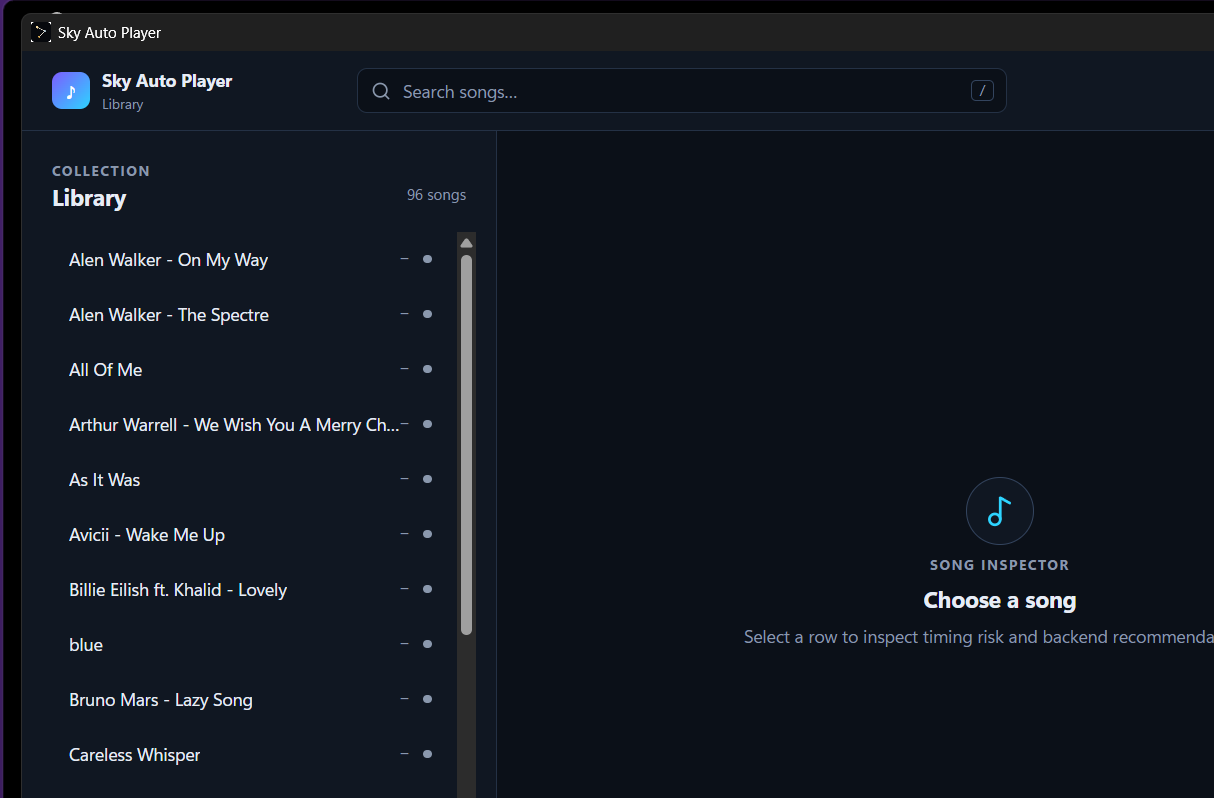
The actual player
Your library, timing profile and controls in one place.
The Tauri desktop app keeps song search, playback setup and status visible in one focused window.
- Search and select songs from the desktop Library.
- Review timing risk and recommendations in Song Detail.
- Keep playback, diagnostics and settings within reach.
Not a generic macro
Built for music, not click sequences.
| Generic macro | Sky Auto Player |
|---|---|
| Sequential key presses | Chords aligned to one dispatch frame |
| Fixed delays | Timing follows the sheet and tempo |
| Tap-focused playback | Notes, chords and holds |
| One global setup | Per-song timing profiles |
| Fixed delay, one-size-fits-all | Learns your machine delay and compensates |
| HUD stutters when busy | Note firing and display run on separate threads |
Three steps
From download to playback in minutes.
Download
Get the canonical Tauri NSIS installer from the official Sky Auto Player GitHub Releases page and install it for the current user.
Add a sheet
Export a JSON, .skysheet or compatible TXT sheet from the Sky Music editor and import it through the desktop Library.
Play
Open Sky Auto Player, choose a song, then switch to the Sky window when you are ready.
KEYBOARD STRIPPress Reload songs in the GUI · / or Ctrl+F focuses search · Esc closes safe overlays
Technical boundaries
Clear about what it does—and what it does not do.
Sky Auto Player runs as a separate Windows application and sends standard input events. Its source is public, so the implementation can be reviewed directly.
- Input
- Windows SendInput
- YES
- Process
- Separate application
- INFO
- Game memory
- Not inspected
- NO
- Code injection
- Not used
- NO
- Game files
- Not modified
- NO
- License
- GNU GPL v3.0
- INFO
- Updates
- Explicit updater with checksum verification
- INFO
NOTICETerms of Service: These technical boundaries do not guarantee account safety. Automated music playback may still conflict with Sky’s Terms of Service. Use the tool responsibly and at your own risk.Read the account-risk guidance
Supported sheets
Load the formats the community already uses.
Structured song sheets with musical events and metadata accepted by the player.
JSON-based sheets with the .skysheet extension used by the Sky music editor ecosystem.
Plain-text files containing a JSON-compatible sheet structure.
Before you download
A few useful answers first.
READY FOR THE PERFORMANCE
Your next performance is already written.
Download Sky Auto Player, add a sheet and let the timing take care of itself.